
- Images can be uploaded to 36Pix using hot folders. To learn how to setup the hot folders with the Desktop App, click here.
- Create a folder inside the hot folder of services you want applied to your images, or drag and drop an existing folder of images into the hot folder.
- After 5 minutes of inactivity, the Desktop App will create a job with the folder of images you put in the hot folder. The job will have the folder name you chose in the job name. The 36Pix Desktop App must remain open on the computer or server where the hot folder is setup. If you close the app, the jobs will be auto-uploaded the next time you login.
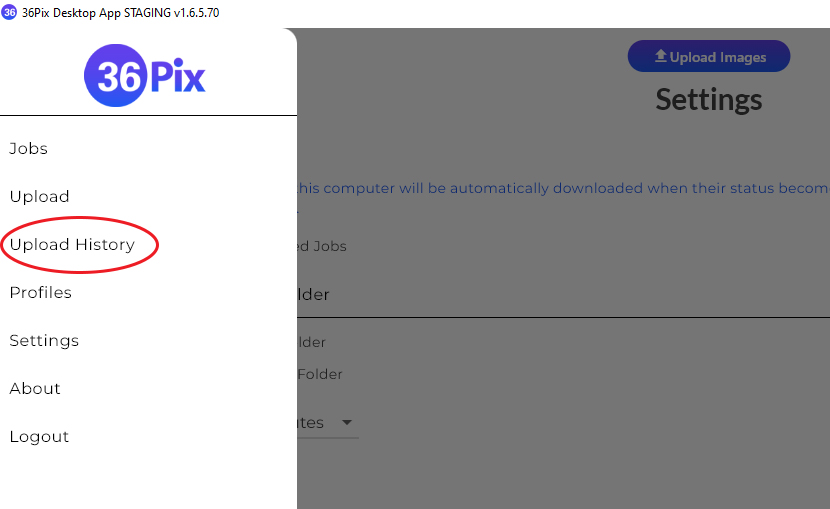
- The upload progress can be viewed by going to the "Upload History" page on the Desktop App.
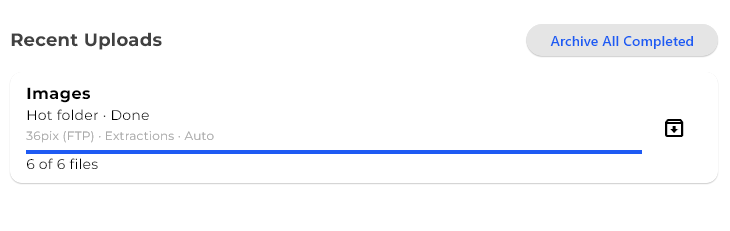
- You will see recent uploads listed on the upload history page. Clicking on an item on the list will allow you to see the filenames and progress of each image in the job.
Uploading Images Using Hot Folders Print
Modified on: Fri, 26 Jun, 2026 at 2:01 PM
Did you find it helpful? Yes No
Send feedbackSorry we couldn't be helpful. Help us improve this article with your feedback.